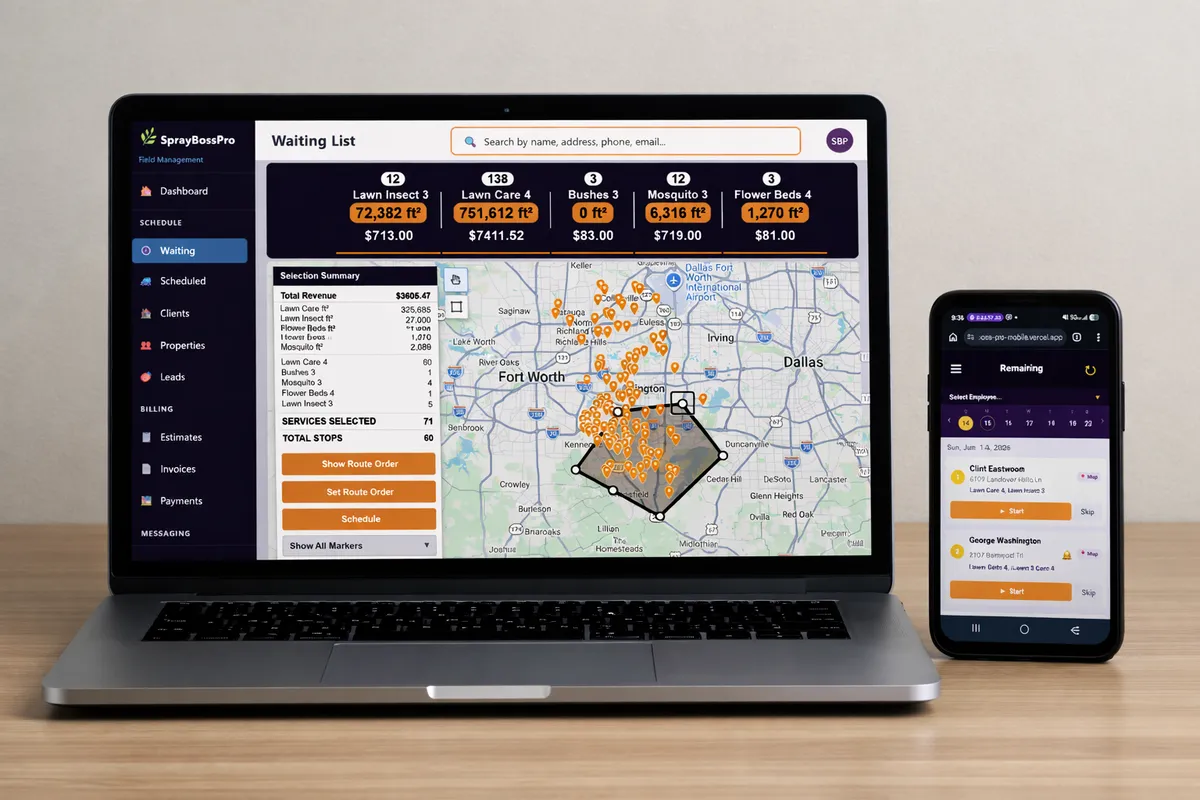
Running a mowing operation is a routing problem first. You have hundreds of recurring yards on a weekly or bi-weekly cycle, two or three crews, and a map that changes every time a customer signs on or cancels. MowBossPro builds tight mowing routes, dispatches them to the right truck, and keeps the whole week organized so no lawn gets skipped and no crew burns an hour driving in circles.
$79/month sounds modest. But the routing engine inside MowBossPro is built to the same standard as software that costs ten times more. The difference is we built it ourselves, for our own mowing crews, and we don't charge a $300/month add-on for the route map or a per-truck fee for dispatch. To see how the whole platform fits together, start at MowBossPro and then dig into routing here.
Live route maps, drag-and-drop stop ordering, and geographic clustering that pulls scattered yards into one efficient loop. See drive time drop before your crew ever leaves the shop.
Set a yard to weekly, bi-weekly, or every-ten-days and MowBossPro rolls it forward automatically. The next visit lands on the calendar the moment a crew marks the last one complete.
One board for the whole day. Assign stops to trucks, balance the load across crews, reorder the run, and push the route straight to every driver's phone.
Two-way SMS inbox plus automated "crew is on the way" and "your lawn is done" alerts. All built in at the flat price — no Twilio account, no third-party setup.
Cards on file, invoicing, charge-after-mow, and overdue reports through Stripe. Bill recurring mowing accounts without chasing anyone down a single phone line.
Each crew gets their stops for the day in route order. Complete, skip, or reschedule a yard and log a note — all from the truck, without one call to the office.
Lasso is the fastest way to build a mowing route we've ever seen. Draw a circle on your service-area map and MowBossPro instantly surfaces every yard inside that radius that's due this week — with stop count, estimated drive time, and route revenue calculated in real time before you commit a single truck to the day.
Most powerful software is complicated. MowBossPro is the exception. Every screen was designed by people who actually built mowing routes and dispatched crews — not UX designers who've never sat in a truck. Your office and your drivers will be running it confidently on day one.
Import your customers and yards, set each one to its mowing cycle, and connect Stripe. Most owners have their first week of routes built the same day they sign up — no implementation consultant, no 90-day setup timeline.
Route map, dispatch board, and the day's stop list are all connected. You're not jumping between five modules or browser tabs. Pull up the board and everything the crews need for the day is in a single view.
The mobile app shows each driver their stops in route order and nothing they don't need. Open it, mow, hit complete, drive to the next pin. No training videos, no IT ticket, no frustrated crew.
Set the visit cycle once. After that MowBossPro rolls every weekly and bi-weekly yard forward automatically, rebuilds next week's route, and fires the customer texts — whether you're on a mower, at home, or on vacation.
Mowing is not plumbing. You're not sending one tech to one job for two hours. You're running the same hundreds of yards over and over on a tight weekly cycle, across multiple crews, and one badly ordered route can cost you an entire truck-day in wasted drive time.
When we were running our own mowing crews, we tried every piece of software out there. The big names, the small names, the ones built for "field service." None of them understood what it meant to have 600 recurring yards that all need to be visited this week and need to be ordered into routes that don't send a truck back and forth across town.
They don't have a real routing engine. Because they weren't built by someone who dispatches mowing crews. We were. We've been in this industry since 2006, and MowBossPro is the routing and dispatch software we always wished existed.
Every feature in MowBossPro exists because we needed it to keep crews moving on a real mowing route. Not because a product manager in a tech office decided it sounded good.
Every tool in MowBossPro was built with mowing route workflows in mind — not adapted from a plumbing app and called good enough.
See every scheduled yard pinned on an interactive map. Drag to reorder stops, build tight geographic loops, and cut drive time before your crew ever pulls out of the yard.
Draw a circle on the map and every yard due inside it is selected and routed in one motion. Stops, drive time, and revenue update live before you commit a truck.
Set any yard to weekly, bi-weekly, every-ten-days, or custom. MowBossPro rolls the next visit onto the calendar automatically the moment the crew marks the last one done.
Assign stops to trucks, balance the day across crews, and reorder the run from one board. Push the finished route straight to every driver's phone.
Drivers get their stops for the day in route order. Mark a yard complete, skip, or reschedule — right from the truck without calling the office.
Automatically text customers when the crew is on the way and when their lawn is finished. Set it once and MowBossPro handles the message for every single stop.
Every yard has its own record — gate codes, mowing notes, service history, GPS pin, and photos. Everything tied to the address, so a fill-in driver mows it right the first time.
A yard rained out or skipped? Bump it to the next run in one tap and MowBossPro keeps the recurring cycle on track without throwing off the rest of the route.
Build a mowing estimate in minutes from your service catalog, email it from the platform, and let customers accept with one click. Auto-follow-ups go out if they don't respond.
Store cards on file via Stripe and charge after each mow or bill the month. Collect on recurring accounts without chasing anyone down.
Convert routes and visits into invoices automatically. Filter by unpaid, partial, paid, or overdue. Every dollar tracked with full payment history, method, and date.
Send and receive texts with customers inside MowBossPro. Full conversation history organized by contact — no more switching to your personal phone.
After a completed mow, MowBossPro can automatically send a Google review request — on your schedule, every time, without you lifting a finger.
3 automated follow-up texts go out if a customer doesn't respond to your mowing estimate. Let MowBossPro chase the deal so you don't have to.
Unpaid invoices trigger 3 automated payment reminder texts. Collect what you're owed without making uncomfortable calls.
Manage active mowing customers and new prospects side by side. Track estimates, route history, and notes tied to each contact in one searchable database.
Apply percentage or fixed-dollar discounts to any estimate. Set sales tax by jurisdiction and let MowBossPro calculate and track tax on every invoice automatically.
Owner, Manager, Office, Crew Lead, and Mobile roles. Control exactly what each person sees and does — from full access down to field-only.
Create truck profiles, assign crews to trucks, and track which truck ran each route. Know exactly what's on every truck every day.
Track crew hours per route and generate payroll-ready reports. Know exactly what you owe before payday without running a separate system.
Stat cards show today's routed stops, yards mowed, revenue, and money owed — all at a glance the moment you log in.
Visit scheduled, on the way, completed, skipped, rescheduled, estimate sent, estimate accepted, review request, payment declined, inbound text — all automated and customizable.
Add every crew member, office staffer, and driver at no extra cost. No per-seat fees. Unlimited users are included in the flat $79/month rate.
No caps on customers, properties, or leads. Whether you mow 50 yards or 5,000 — MowBossPro routes them all at the same flat price.
This is where the routing engine earns its keep. MowBossPro's dispatch board doesn't just list which yards need mowing — it groups them by crew and day, totals stops, drive time, and revenue per route, and lets you balance the load across trucks before anyone leaves the shop. For a full walkthrough of building, ordering, and dispatching your routes, read Mowing Route & Dispatch Software: The Complete Guide for Lawn Care Businesses.
Mowing lives or dies on the recurring cycle. MowBossPro tracks every yard's visit interval and rebuilds next week's routes automatically — so the same lawn gets mowed on schedule, week after week, without anyone re-entering it by hand.
We were paying $500–$700 a month for software that nickel-and-dimed us for the route map and the dispatch board. We built MowBossPro to be the pricing we always wished existed.
No contracts. Cancel anytime. No hidden fees — ever.
Yes. MowBossPro is a routing and dispatch platform for lawn mowing operations: recurring visit cycles, circle-map route building, a crew dispatch board, customer texts, estimate-to-service conversion, and card-on-file payments. It's designed for companies running weekly and bi-weekly mowing routes, not general service businesses.
You open the circle-map lasso tool, draw a circle around an area, and every yard due inside is selected and added to a route. Stop count, estimated drive time, and route revenue update in real time. You then drag stops into the most efficient order and push the route to the crew. Route planning that takes 30 minutes in a spreadsheet takes 5 minutes on the map.
Yes. Set each yard to weekly, bi-weekly, every-ten-days, or a custom interval, and MowBossPro auto-schedules the next visit the moment a crew marks the last one complete. Next week's routes rebuild themselves, so the same lawns get mowed on schedule without re-entering anything.
The dispatch board groups the day's stops by crew and truck, totals stops, drive time, and revenue per route, and lets you balance the load across crews before anyone leaves the shop. Each driver gets their stops in route order on the mobile app and marks them complete, skipped, or rescheduled from the truck.
Yes. MowBossPro sends automated on-the-way and lawn-is-done texts for every stop, plus a two-way SMS inbox for replies. 500 outbound texts are included each month, with more available at $15 per additional 500.
$79/month, all features included — routing, dispatch, the mobile app, customer texts, and payments. No per-user fees, no add-ons for the route map or dispatch board, no setup fees. 14-day free trial with no credit card required.
Routing and dispatch is one piece of how MowBossPro runs your mowing business — for the full picture of scheduling, billing, and crews, see the full platform overview.
MowBossPro is the only mowing routes and dispatch software built by someone who has actually run crews and ordered the routes. Try it free for 14 days.